Docs
Position Records
Review & Playbooks
Review Workflow
What one review should produce
A complete review should leave three results: what happened in the trade, why you acted that way, and what to check next time. Verify facts first. Explain the cause second. Change the Playbook last.
The workflow below connects Overview, Positions, Position Details, context, and Playbook. You do not need to process every record at once. Each conclusion only needs to lead back to real positions.
Step one: choose the review sample
- Open the dashboard. Select
All Accountsor one account in the header. - In
Overview, selectWeek,Month,Quarter,Year, orAll Time. - Open
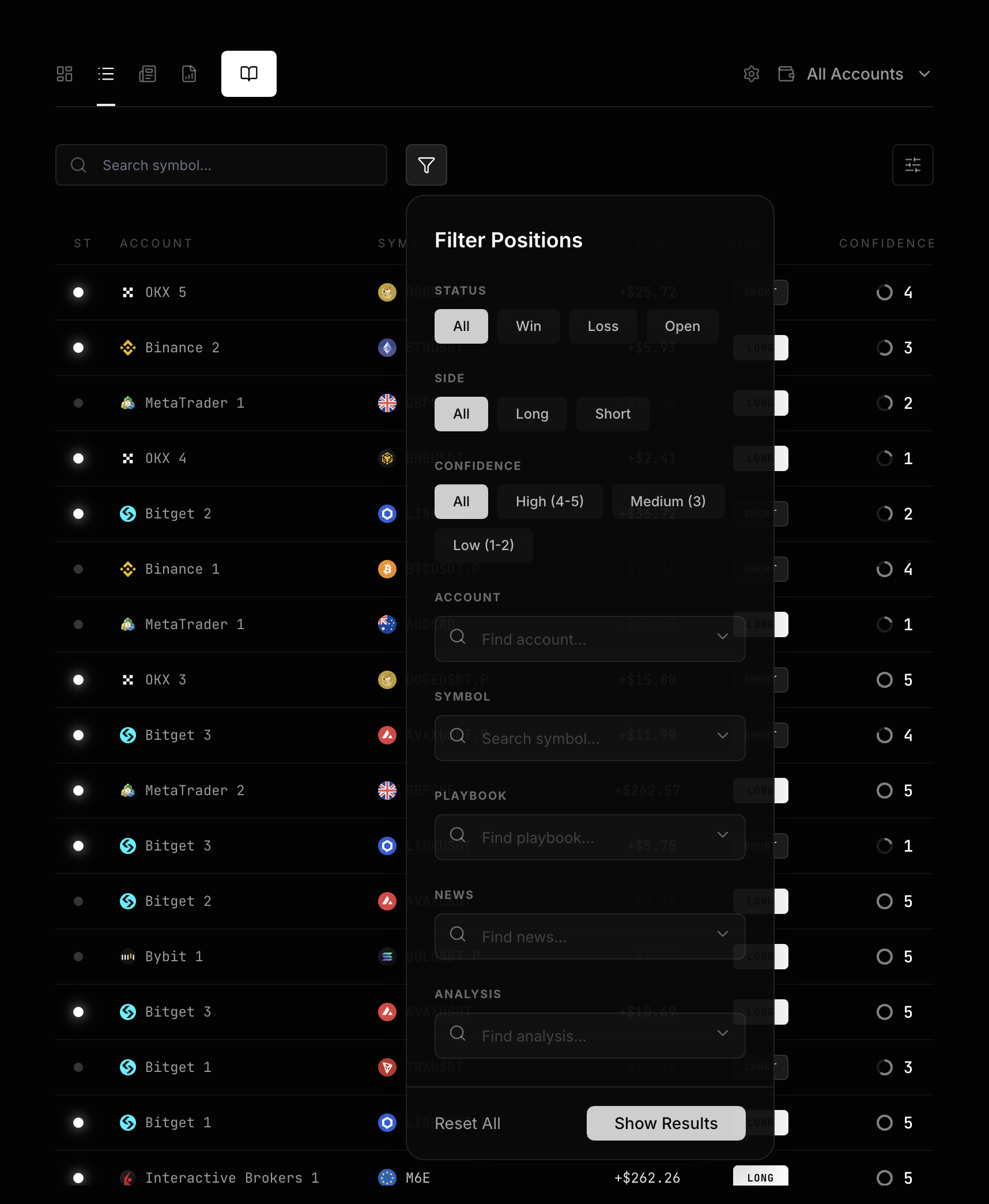
Positionsfrom an unusual date, or openFilter Positionsdirectly. - Narrow the set by
STATUS,SIDE,CONFIDENCE,ACCOUNT,SYMBOL,PLAYBOOK,NEWS, orANALYSIS. - Select
Show Results, then sort byProfitorOpened At.
Filters and search apply together. Start with one question, such as “Why did LONG trades in this account lose this month?” Do not stack every dimension at once.
Step two: verify the facts of each trade
Select a position row to open its details. Check these items in order:
- Do
Status,Exit Price, andClosed Atagree? - Are
Entry Price, size,Fee, andNet PnLcomplete? - Do
Target Price,Stop Loss,Planned R:R, andReal R:Rmatch the original plan? - Does
Confidencestill describe the view at entry rather than the result you know now?
Statistics treat a position as closed when Status is Close or Closed At exists. These fields can disagree temporarily, so check both. See Position Details and Position Lifecycle for the complete field and formula rules.
Step three: complete evidence and context
Finish three tasks in Position Details:
- In
Notes, record the plan, execution difference, and result unique to this trade. - Add trade screenshots under
Attachments. Use OCR only when needed. See Charts, Attachments, and OCR. - Link
News,Key Level,Confluence, orMarket Analysisonly when you will reuse it. See Context Notes for the boundary.
Do not create context only to make a record look complete. Keep one-off information in Notes. Save it separately when you need to reference it a second time.
Step four: understand the statistics
Context and Playbook summaries follow real file links back to positions. Numbers on the same screen may use different samples.
| Metric | Positions it includes |
|---|---|
Positions, Trades |
Every position resolved to the current context or Playbook, including open positions, zero-profit positions, and positions with missing Profit. |
Win Rate |
Only closed positions whose profit is a nonzero number. It shows 0 when there is no sample. |
Net Profit |
Sums the same closed positions whose profit is a nonzero number. |
Largest Profit, Largest Loss |
Take extremes only from that same performance sample. They have no value when there is no sample. |
For example, a Playbook shows 10 TRADES, but only five are closed with a nonzero numeric Net PnL. Three of those five are wins, so the page shows a 60% Win Rate. That is 3 ÷ 5, not 6 ÷ 10.
Step five: write the conclusion
Write the single-trade conclusion in the position’s Notes first. An actionable conclusion includes at least:
- Fact: what the plan said and what actually happened.
- Cause: whether the difference came from the market, the decision, or the execution.
- Next action: what to confirm or prohibit before entry.
Only after the same conclusion appears across several positions should you move it into a Playbook. Use Criteria sections for review stages and Confluence for repeatable condition sets. See Playbooks and Criteria for creation and linking.
How daily and periodic reviews divide the work
| Cadence | Scope | Done when |
|---|---|---|
| Daily or after each trade | Positions that just closed or changed | Facts, evidence, context, and the single-trade conclusion are complete. |
| Weekly or monthly | A group under one Account, Symbol, Playbook, or context entry | You found a repeated pattern and decided whether to change Criteria or Confluence. |